
Support
Customer context is not the same as remembering
The bot on the night shift opens with nothing of Monday in front of it. SmartMemory gives your support desk one notebook that does not close when the shift does.
pip install smartmemory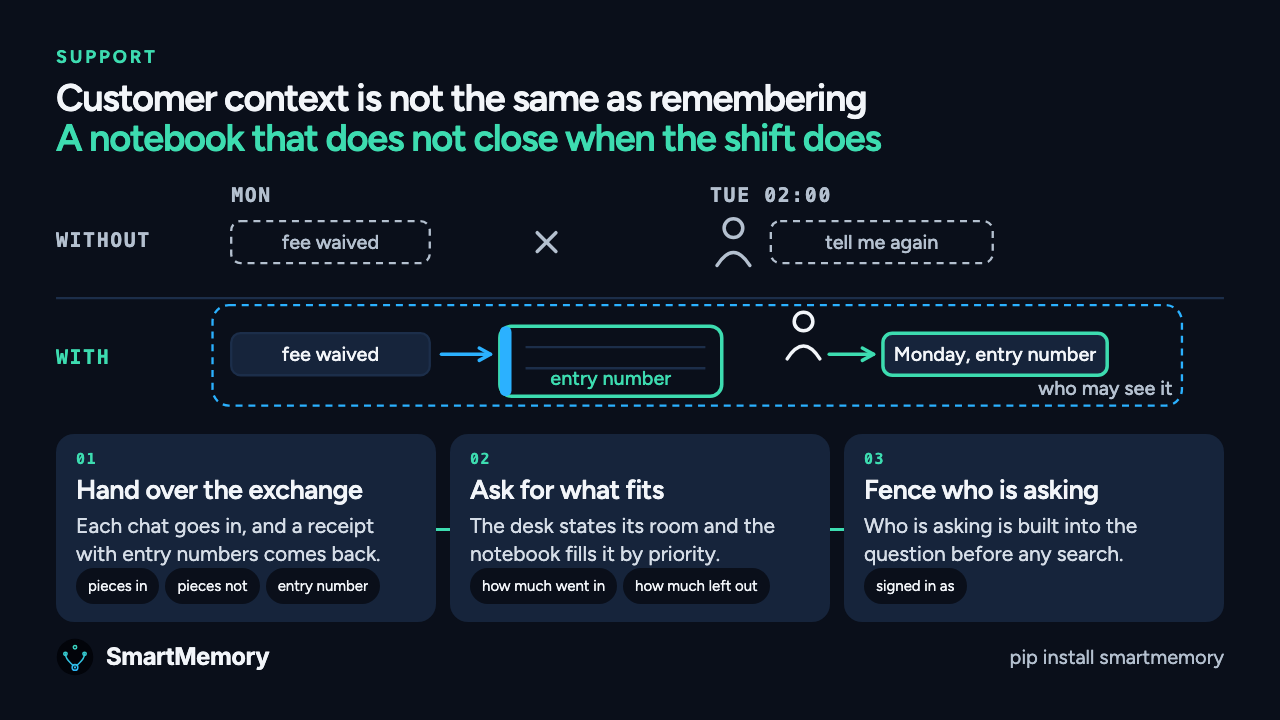
One week on the support desk, run twice
Read the transcript
Most support software sells you a box called customer context. Open it and it is a few ticket fields glued onto the front of the conversation. Useful. Not the same as remembering. Remembering the customer is the easy half. Two halves get hard.
Who is allowed to see what. And what should come back, when there is more than will fit.
Meet the desk. A customer with a problem. A bot on the front counter. The same bot again on the night shift. A specialist for the hard ones. And a team lead who decides how this sort of thing gets handled.
Tickets arrive at every hour and nobody staffs every hour. And when the shift ends, the bot does not carry the morning into the night. On Tuesday it opens with nothing of Monday in front of it, and anything it knows it has to go and ask for.
Monday, nine in the morning. The customer writes in. The box arrived crushed. The front counter bot is warm, quick and correct. Replacement on the way, and we will waive the redelivery fee. Tuesday, two in the morning.
The same bot picks up the follow up. Same name on the badge, no memory of Monday, because the morning lived in a window that closed with the shift. So it asks the customer to explain the whole thing again. Then it quotes the fee. Wednesday. The customer replies, unhappily.
A specialist opens the thread. Forty messages, in order. Three of them decide the case. Finding those three takes a full read, and the customer waits. Thursday. The same crushed box, from a different account, and the desk works it out from scratch, because the way the team lead wanted it handled is in a message from March.
Nobody was rude. The desk simply met every one of them for the first time.
Run the week again, one thing added. Behind the counter there is now a notebook the desk writes to and reads from. Monday. The exchange goes into the notebook. The desk hands it over and gets a receipt, saying how many pieces went in, how many did not, and an entry number for each one that did. Monday's piece came back with a number, so the desk treats it as written down.
And the notebook does not go off and read anything on its own. It answers questions somebody asked it. Tuesday, two in the morning. Nothing was handed over, because there is no morning shift left to hand it over. So it asks the notebook. And if Monday's note is what that question reaches, and it fits the room the desk allowed, Monday is in front of the bot before it says a word.
Wednesday. The specialist. The tempting move is to hand them everything the desk knows about this customer. A suitcase you cannot close. So it does the opposite. It says how much room there is and asks for what fits.
Things go in by priority, and that order is fixed. Underneath, a line saying how much went in and how much was left out. Left out means left out of this answer, not left out of the notebook. It may fit the next answer, depending on the question and the room. So the specialist reads something that fits, and knows how much they are not seeing.
Now the question a manager should ask. Where is the line, and who draws it? Not a polite instruction at the top of the conversation. An instruction can be talked around. It is part of the question. The desk says who it is asking as, and that is built in before anything goes looking.
And here is the part that gets oversold. The notebook has no idea what a customer is. The line goes around whoever the desk signed in as. A line around one account is one your team draws, by having that account sign in as itself. The notebook holds the line where you put it. It does not choose where it goes.
Thursday. The crushed box from the other account. Back in March the team lead wrote down how this one gets handled. Replace it, waive the redelivery, log it. First time round, that was a message in a thread. This time it went into the notebook, as the way we do this, an ordinary candidate when somebody asks.
Nothing scored the ticket. Nobody was told. Somebody asked an ordinary question, and the team lead's answer was eligible to come back. A manager's judgement, written down once, and no longer living only in a thread from March.
Friday. The sentence every support organisation dreads. You told me you would waive it, and I have just been charged. First time round, the answer is let me look into it, and a full read of the thread. Here, the desk reconstructs nothing. Monday's note has an entry number, so it goes and gets that entry and reads it out.
What was said, when, which desk it belongs to, and which identity wrote it down. The answer does not depend on which shift is standing there when the question arrives. You do not get to say trust me. You get to show them the Monday.
Notice what did not happen. Nothing was deleted. Nothing chased anybody. No alarm went off, and nothing warned the desk a promise was coming due. Everything you just watched was a question the desk asked, and an answer it got back. That is what SmartMemory is.
A notebook your support bots share, one that does not close when the shift does. If you want to see how it actually works, that is Part 2.
Nobody was rude. The desk met every one of them for the first time.
Useful. Not the same as remembering.
On Monday a customer writes in. The box arrived crushed. The bot on the front counter is warm, quick and correct: a replacement is on the way and the redelivery fee is waived.
At two on Tuesday morning the same bot picks up the follow up with no memory of Monday, because the morning lived in a window that closed with the shift. It asks the customer to explain the whole thing again, then quotes the fee. On Wednesday a specialist opens forty messages, three of them decide the case, and the customer waits through a full read.
On Thursday the same crushed box arrives from a different account, and the desk works it out from scratch, because the way the team lead wanted it handled is in a message from March.
How it works on the support desk
- Step 1
Hand over the exchange, get a receipt.
When a conversation ends, your application hands it to the notebook. What comes back is a receipt: how many pieces went in, how many did not, and an entry number for each one that did. The desk treats Monday as written down only when its entry number came back.
- pieces in
- pieces not
- entry number
- Step 2
Ask for what fits the room.
The desk says how much room there is and the notebook fills it in a fixed priority order. Underneath is a line saying how much went in and how much was left out. Left out means left out of this answer, not out of the notebook.
- how much went in
- how much left out
- Step 3
Draw the line around who is asking.
The desk says who it is asking as, and that is built into the question before anything goes looking. The line goes around whoever the desk signed in as, so a line around one account is one your team draws, by having that account sign in as itself.
- signed in as
The sentence every support team dreads
Customer, FridayYou told me you would waive it, and I have just been charged.
Found it. Monday's note has an entry number, so I opened that entry. We said we would waive the redelivery fee, on Monday morning, for this desk, and the note shows which identity wrote it down.
- What was said
- a replacement is on the way and the redelivery fee is waived.
- When
- Monday, nine in the morning.
- Which desk it belongs to, and which identity wrote it down
- both on the entry.
Tested, with the method shown
Every change is kept, with its history
Decisions are never silently overwritten. One call shows where a memory came from, what it replaced, and whether its history checks out.
Each team sees only its own memory
Every read and write is scoped to a workspace, user or tenant, so one team never sees another team's memory.
Questions support teams ask
Does it know what a customer is?
No. The notebook has no idea what a customer is. The line goes around whoever the desk signed in as. It holds the line where you put it and does not choose where it goes, and it does not promise that nothing can ever escape. It says where the check sits.
Does left out mean deleted?
No. Left out means left out of this answer. It may fit the next answer, depending on the question and the room.
Does it read our inbox?
No. The notebook does not go off and read anything on its own. Your application hands it something, and it answers questions somebody asked it.
Does it replace the ticketing system?
No. The ticketing system still holds the tickets, the specialist still takes the hard ones and the team lead still decides how.
Will it warn us when a promise is due?
No. Nothing was deleted, nothing chased anybody and nothing warned the desk. Everything in the film was a question the desk asked and an answer it got back.
Keep Monday on the record.
A notebook your support bots share, one that does not close when the shift does.
pip install smartmemoryOther teams, other weeks
- On callFour engineers solved the same outage four times in one week
- CodingYour codebase records what got built, not what got rejected
- AgentsYour AI agents never tell each other what they learned
- SalesThe one thing you need before the next call is not in your notes
- ComplianceEleven months later, somebody asks you to show why
- HealthcareFour clinicians, one chart, one missing sentence
- FinanceWhy does the desk own this? Nobody can say.
- LegalYour firm already answered this, last year, in another file
- RoboticsA robot stopped in aisle nine. The same fault happened ten days ago.